Bill once. Stock, GST and books are already done.

No more matching counter bills against Tally or Excel at night. Every sale automatically updates your stock, GST and accounts as it’s completed. Billing, inventory and accounting work together in one system, not three.

Free during Early Access. No card needed. Android app coming soon.

₹0
Revenue tracked today
0
Sales billed this month
0
SKUs tracked in real time

Example data, animated for this page, once you’re billing, these are your own numbers, live.

Bosch Drill 500W 28 units in stock, reorder below 30
Tax Invoice INV-2847
Bosch Drill 500W ×1₹4,299
Makita Blade Set (5pc) ×2₹1,780
Safety Gloves L ×3₹1,350
Subtotal₹7,429
Discount−₹200
GST (18%)₹1,301
Total₹8,530
Paid by UPI, ₹8,530 Paid

One bill. Four ledgers. Nothing to match later.

In most shops, billing, stock and accounts live in separate places. Someone has to spend the evening making them agree.
In RetailFlow, one sale updates all four records together. No duplicate entry. No end-of-day tallying.

Tax InvoiceINV-3105
Extension Board 4-socket ×1₹1,180
Taxable value₹1,000.00
CGST 9% + SGST 9%₹180.00
Paid by UPI₹1,180
  1. StockExtension Board, 14 → 13 units. Batch B-0912 used first, at its own cost of ₹720, so this bill’s profit is ₹280.
  2. GSTOutput CGST ₹90 and SGST ₹90 booked against the invoice, ready for the tax summary and e-invoice (IRN).
  3. BooksSales ₹1,000 and tax payable ₹180 posted to the journal, received through UPI, waiting to be matched on your bank statement import.
  4. CustomerAdded to the customer’s purchase history with loyalty points earned, and both reversed automatically if the sale is refunded.

For your Chartered Accountant
Your profit & loss, balance sheet and GST summaries are built from the same business records. If your CA works in Tally, export the accounting data for the period instead of entering everything again.


Built for shops where stock moves fast and margins are thin.

RetailFlow fits best where billing speed, batch-level costing and expiry all matter at the same counter.

Supermarkets & kirana

A queue at the counter, regulars on credit, and stock that is sold by the case, the pack and loose.

  • Barcode billing with F1 and F4 shortcuts
  • Case, pack and unit prices on one product
  • Customer credit, settled oldest bill first
  • Reorder alerts before the shelf empties

Bakeries & specialty food

You make part of what you sell, it expires, and ingredient prices change every week.

  • Bill of materials and production runs, with wastage
  • Expiry dates per batch, oldest sold first
  • “Expiring soon” list before it becomes a write-off
  • Per-batch cost, so profit stays true

Cosmetics & wellness

Repeat customers, shelf-life on every product, and offers that have to switch off on time.

  • Batch and expiry warnings in the cart
  • Loyalty points, earned and redeemed automatically
  • Coupons: percentage, flat, Buy X Get Y
  • A branded online store on the same stock

Electronics, hardware & multi-brand

High-value items, supplier prices that keep moving, quotes before the sale and warranties after it.

  • Quotations that convert into a sale
  • Warranty months printed on the invoice
  • Cheaper-supplier hint while you order
  • Stock per store, with transfers

Not the right fit: restaurants and cafés with table service. RetailFlow has no tables, kitchen order tickets or menus, and we would rather tell you now.


See the real app, on the counter and on your phone.

These are real screenshots of RetailFlow, captured from a working demo store — not mockups.
Use the same application on your desktop, tablet or phone. Your staff don’t need a separate mobile app to get started.

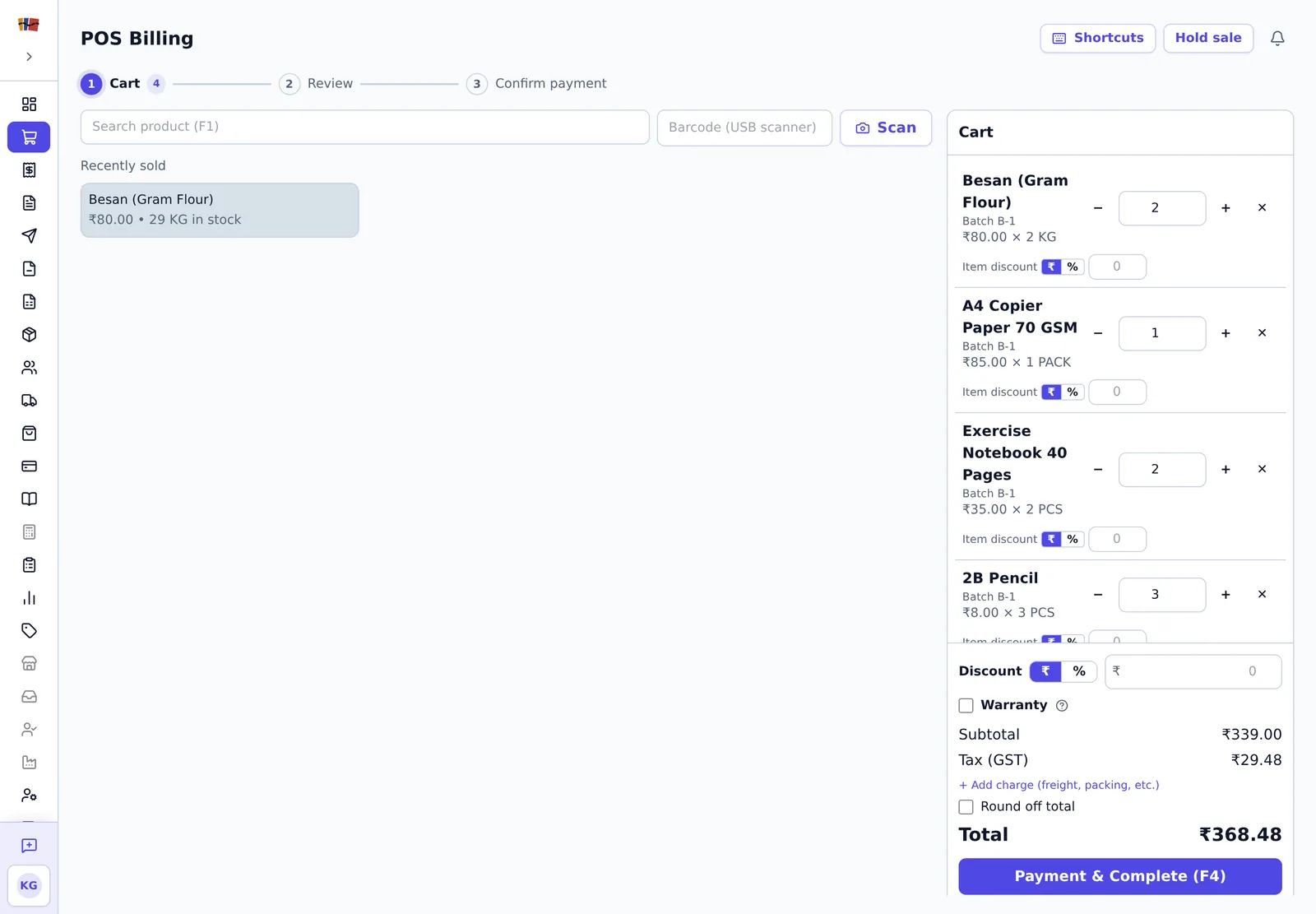
RetailFlow POS billing screen: a cart with besan sold by the kilo, copier paper, notebooks and pencils, each from its batch, with subtotal ₹339, GST ₹29.48 and total ₹368.48, and the Payment & Complete (F4) button.
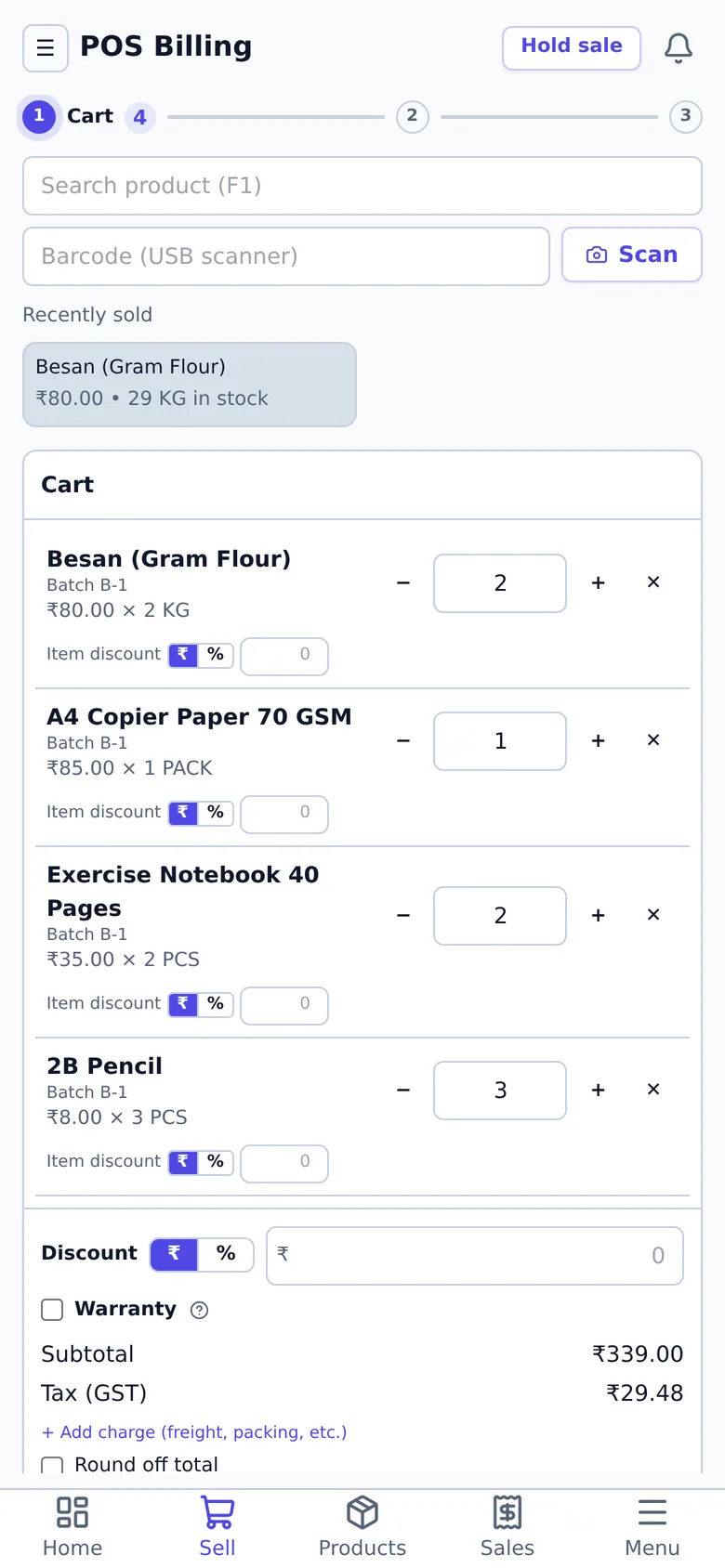
The same POS cart on a phone, with search, barcode scan and bottom navigation.

Billing that works at the counter.

Search products with F1, scan barcodes using a USB scanner or your phone camera, and complete checkout with F4.

Every cart line retains its batch information, so stock cost and expiry stay connected to the sale. Sell loose products like besan by the kilo or gram.

  • USB scanner or phone-camera barcode scanning
  • Fixed or percentage discounts, per item or entire bill
  • Hold a sale and resume it later, even after refreshing the page
  • Record voids and refunds with a reason, including cash refunds or store credit
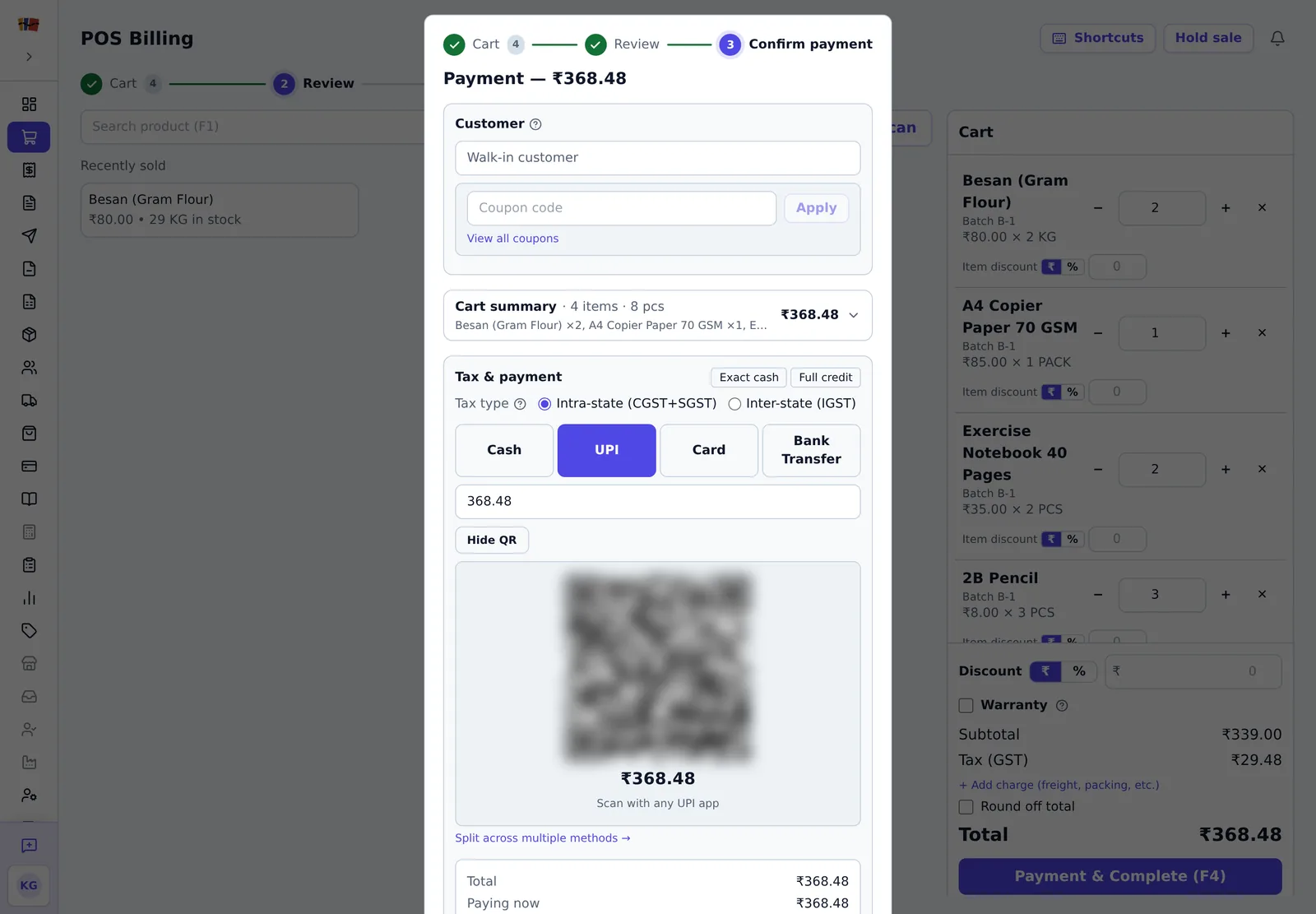
RetailFlow payment step for ₹368.48 with UPI selected, intra-state CGST and SGST chosen, and a UPI QR code generated for the exact amount.
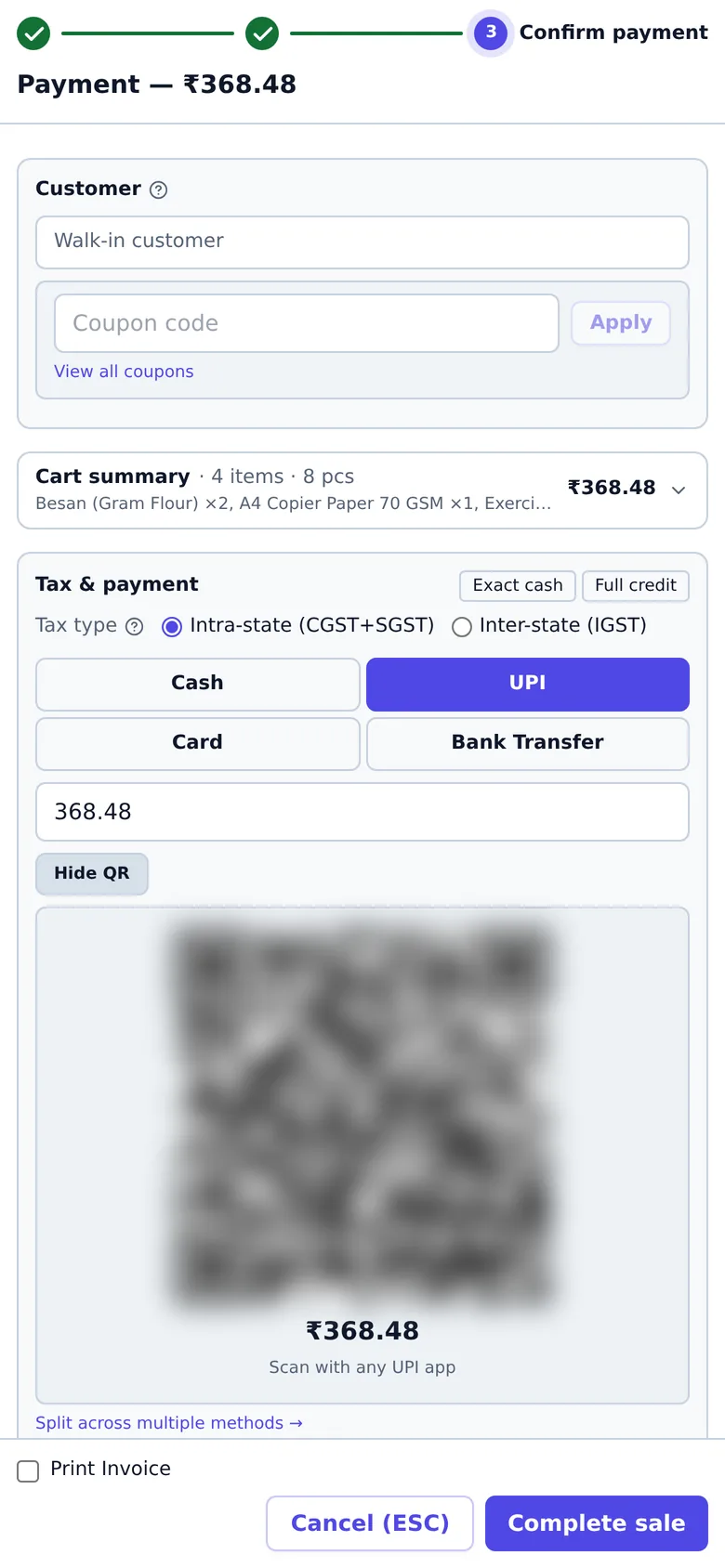
The UPI payment step on a phone, with Cash, UPI, Card and Bank Transfer options and the Complete sale button.

UPI payments, no amount to type.

Pick UPI and RetailFlow generates a QR for the exact bill amount, so the customer scans and pays without typing anything. The QR is blurred here because it carries the demo store’s real UPI ID.

  • Cash, UPI, card, bank transfer and customer credit
  • Split one bill across methods, for example part cash and part UPI
  • Intra-state (CGST + SGST) or inter-state (IGST) on the same screen
  • Coupons and the customer’s account applied before payment
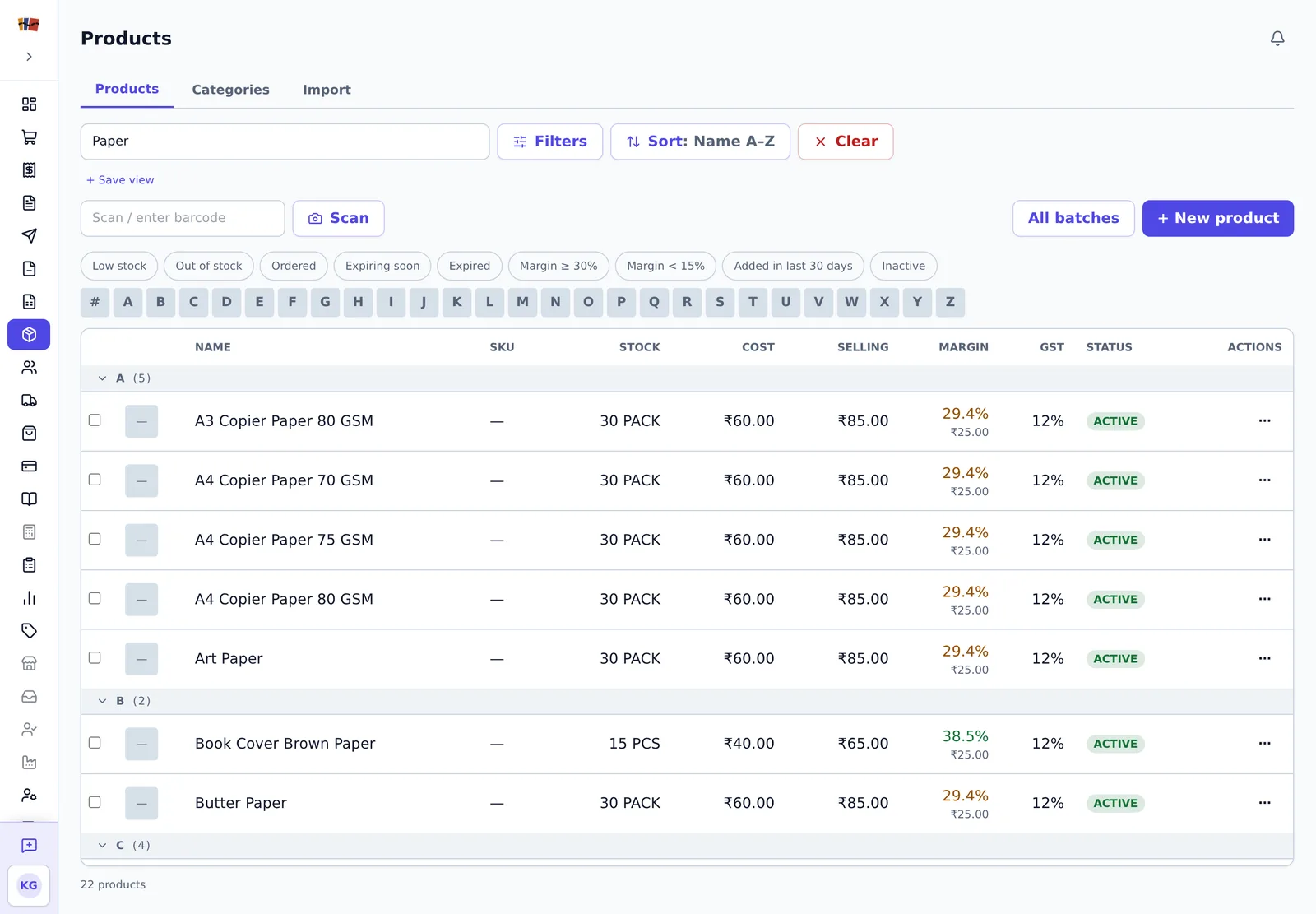
RetailFlow products list filtered to paper, showing stock, cost, selling price, margin, GST rate and status for each product, with filters for low stock, expiring soon and margin.
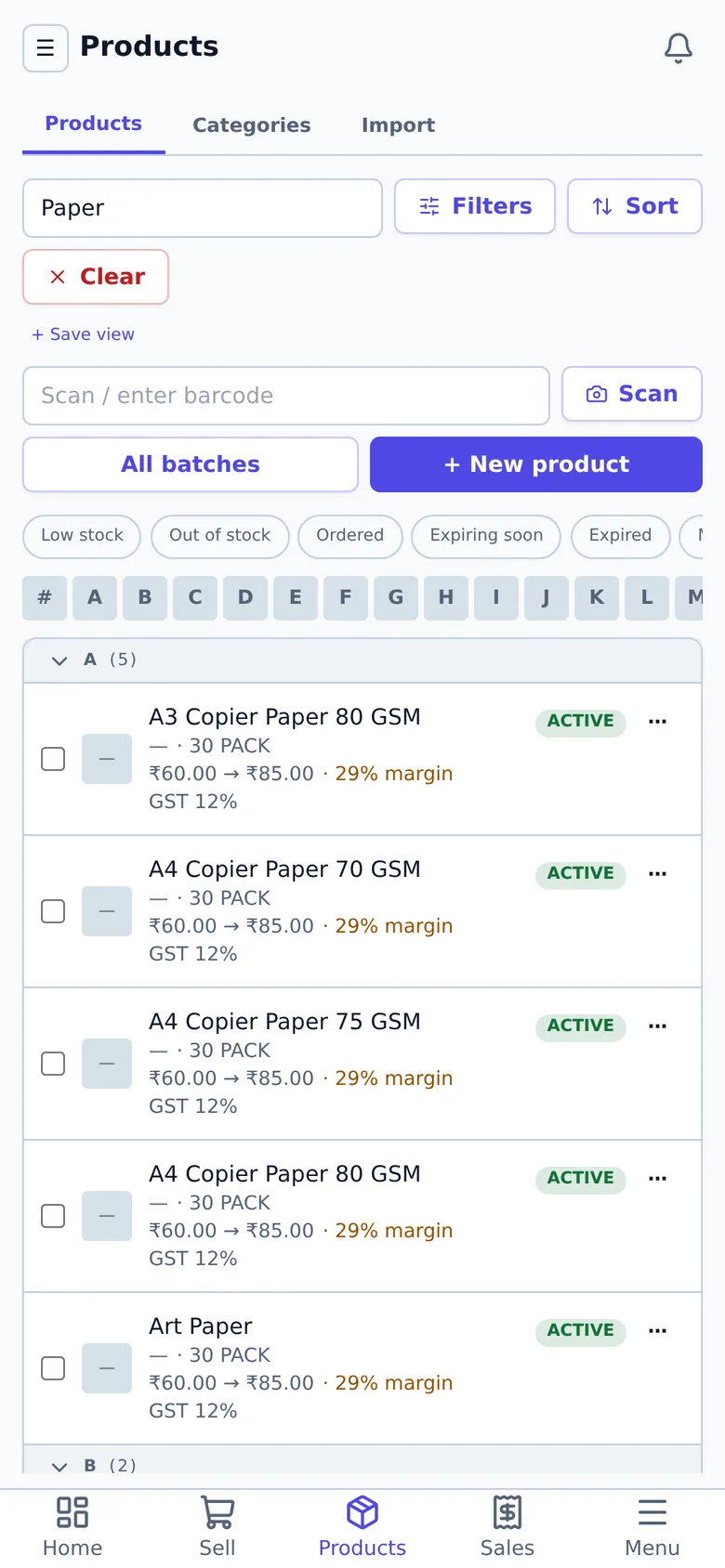
The products list on a phone, with stock, cost to selling price, margin and GST on each card.

Stock, cost and margin at a glance.

Every product shows stock, cost, selling price, margin and GST in one row. One tap filters to low stock, expiring soon or thin margins, and All batches lists every batch with its own cost and expiry.

  • Bulk import from CSV or Excel, with a preview before anything changes
  • Bulk-edit price, GST, category or status across up to 500 products
  • Saved views for the filters you use every day
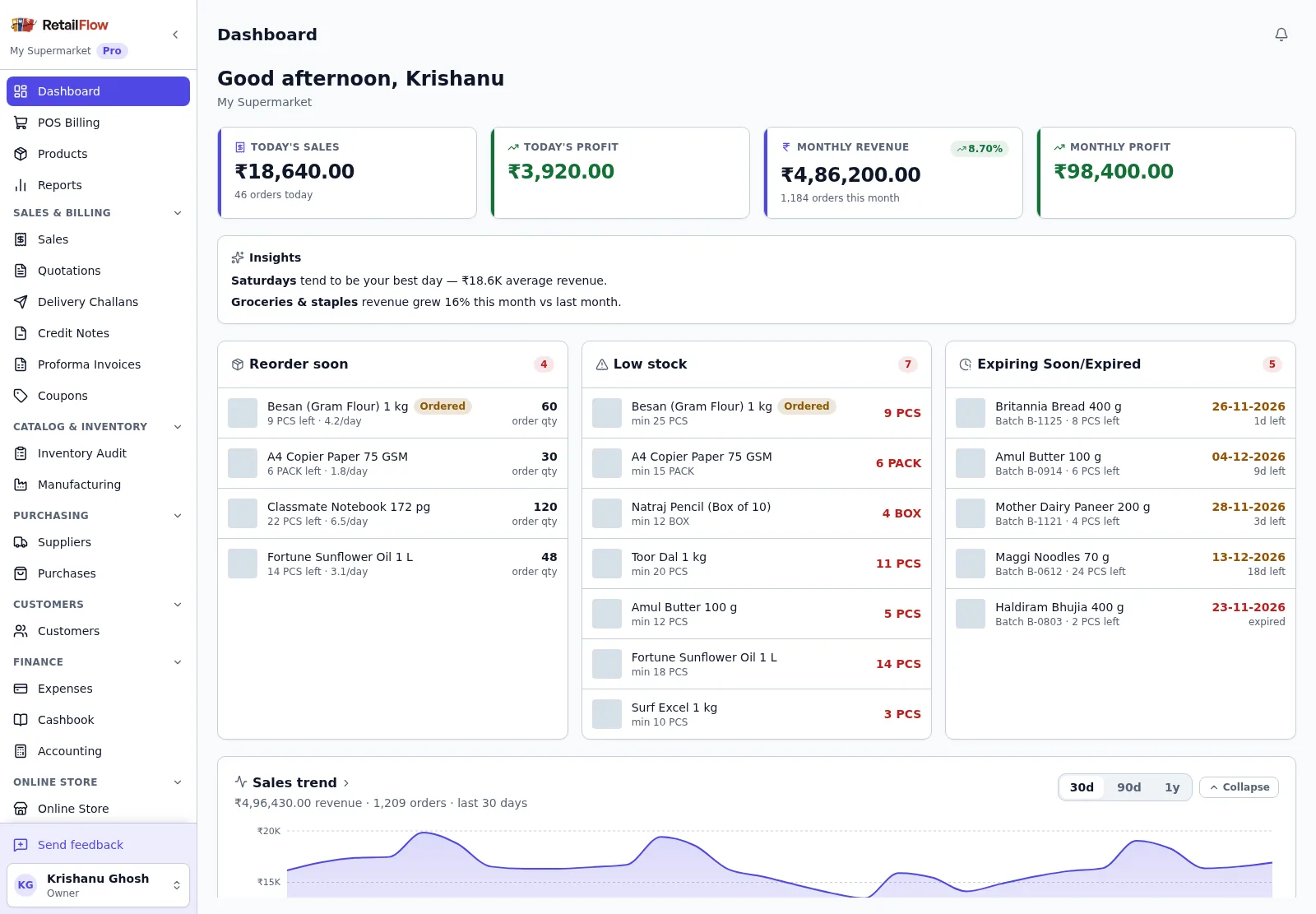
RetailFlow dashboard on a desktop: today’s sales and profit, monthly revenue and profit, a revenue trend chart, cash position, receivables and payables, and low-stock, reorder and expiry alerts.
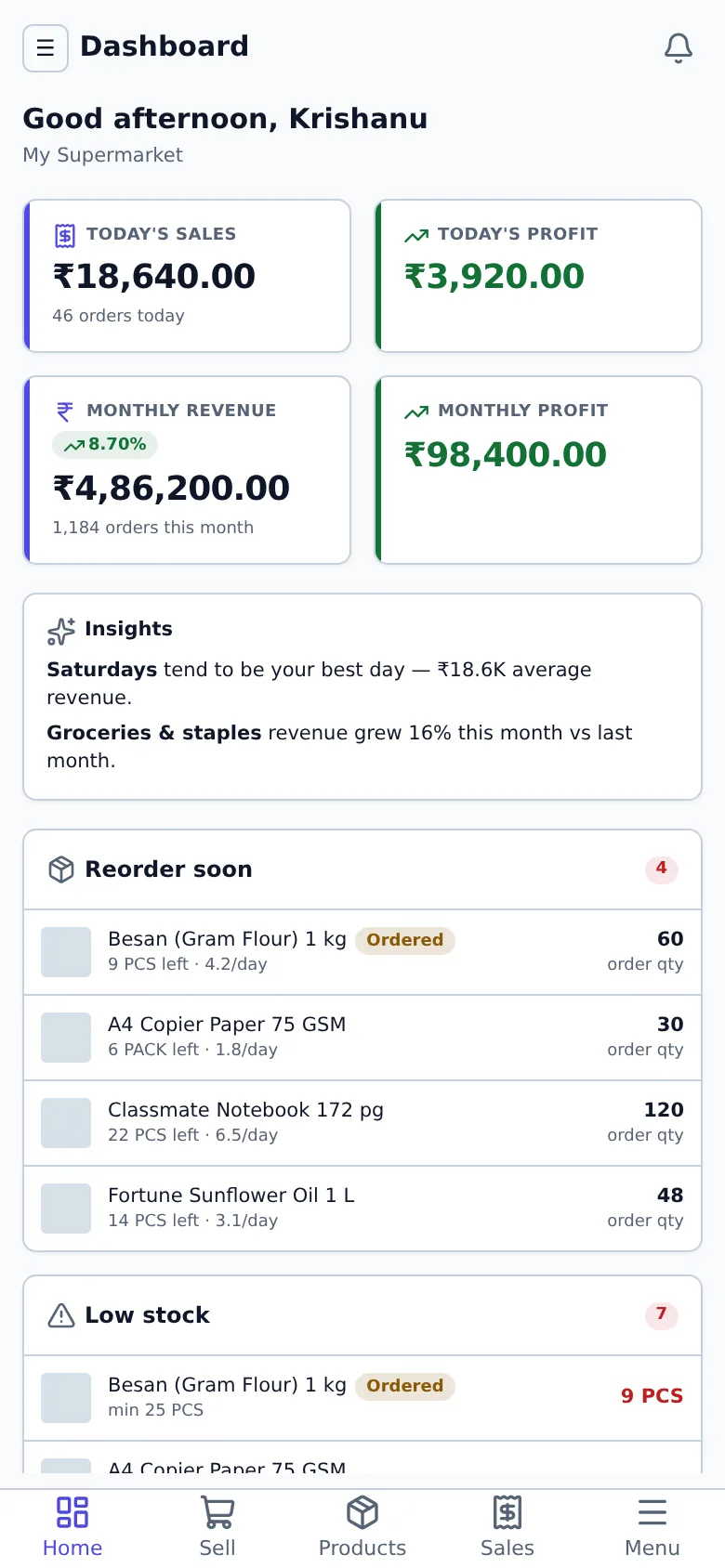
The same dashboard on a phone, with today’s sales and profit at the top and the alerts below.

Your day, summed up before you ask.

Open RetailFlow and the day is already summed up: what you sold, what you made on it, and what needs attention before the shop opens tomorrow. It refreshes on its own every 30 seconds, so the counter and the back office see the same numbers.

  • Today’s and this month’s sales and profit, with a revenue trend you can widen or narrow
  • Cash position after clearing payables, plus who owes you most and whom you owe most
  • Low stock, reorder soon and expiring batches, each one tap from the list
  • Top customers and top category, per store or across every location

Rather click around yourself? Open a demo store with products and customers ready, free for 20 minutes. No sign-up needed.

Try live demo

Twelve modules. One set of records.

Each module reads and writes the same sales, stock and accounts, which is why nothing needs exporting, re-typing or reconciling between them. Here is what is in each one.

POS & billing

Counter checkout with discounts, split payments, held sales and partial refunds, ending in a GST invoice on paper or WhatsApp. Keyboard-first, with ? listing every shortcut.

Barcode scanMulti-paymentUPI paymentsHeld salesPartial refundsVoid & refund reasons

Smart inventory

Batch-level stock with expiry dates, reorder suggestions, stock audits, dead-stock and ABC reports, and printable barcode labels.

Per-batch costingReorder alertsExpiry filtersStock audit

Multi-location & transfers

Run several stores or warehouses from one account, with staff assigned per location and batch-level transfers between them.

Multi-storeStock transfersLocation switcherPer-location staff

Online storefront

A branded online store on your live catalogue. Orders are packed and fulfilled from the same dashboard, with delivery fees applied automatically.

Branded pageOnline ordersOrder fulfillmentDelivery fees

Analytics & reports

Revenue trends, category and product performance, customer rankings and P&L, exportable to CSV, Excel or Tally.

Revenue chartsP&LTally export

Customers, loyalty & coupons

Purchase history, balances and credit limits per customer, plus loyalty points and coupons: percentage, flat or Buy X Get Y.

Credit salesLoyalty pointsCouponsCredit settlement

GST & e-invoicing

Per-product GST rates, inclusive (MRP) and exclusive pricing, GSTIN validation, TDS/TCS handling and e-invoice (IRN) generation.

E-invoice (IRN)GSTIN validationInclusive & exclusive pricing

Accounting & reconciliation

Chart of accounts, auto-posted journal entries, profit & loss and balance sheet, plus bank statement import for reconciliation.

Chart of accountsBalance sheetBank reconciliation

Staff, payroll & access

Owner, Manager, Cashier or custom roles, plus attendance, weekly-offs, salary advances and payroll.

Custom rolesAttendancePayroll runs

Suppliers & purchases

Purchase orders, partial deliveries, returns and a running ledger per supplier, with a hint when another supplier last sold you the same item for less.

Purchase ordersSupplier price comparePartial deliverySupplier ledgerPurchase returns

Manufacturing

Bills of materials and production runs with wastage, keeping raw materials separate from finished goods.

Bill of materialsProduction entriesWastage tracking

Quotations & documents

Quotations, proforma invoices, delivery challans and credit notes. A quotation converts into a sale without re-entry.

QuotationsDelivery challansCredit notes

Billing & sales

Bulk-pack & multi-unit selling

Sell by case, pack, or unit, pricing adjusts automatically.

Batch-aware cart

Cart flags expiring stock and picks the right batch first (FIFO).

Out-of-stock indicator

Search shows what’s out before you try to sell it.

Recently-sold quick add

Jump back into fast-moving items without searching.

Per-sale profit view

See the margin on every invoice, not just the total.

Refund request workflow

Cashiers raise refund requests; managers approve or decline.

Cart survives a refresh

Reload the page mid-sale and the cart is still there.

Hold on sign-out

Signing out mid-sale offers to hold it, so nothing is lost.

Void & refund reasons

Every void or refund records why, from a preset list or a note.

Cash or credit on void

Pay a voided sale back from the till or onto the customer’s credit.

Cashier on every sale

See who billed each sale, right in the sales list.

Products & catalog

Bulk import via CSV/XLSX

Upload your catalog with a template and row-level error reporting.

Opening-stock import

Seed starting quantities in one upload when you switch over.

Multiple barcodes per product

One SKU, every barcode variant it ships with.

Product images

Photos hosted and auto-compressed, no storage to manage.

Multi-level units

Base, pack, and case, each with its own price.

Batch price sync

Editing a batch’s cost keeps the product’s price in sync.

Bulk edits with preview

Change category, price, GST, or status on up to 500 products at once.

Import updates, safely

Re-upload to update existing products, with a dry-run preview first.

Margin at a glance

Filter and sort your catalogue by margin.

Price + GST preview

See what the customer actually pays while you set a price.

Duplicate a product

Start a new item from an existing one, barcode clash checked.

Inventory & batches

Expiry & perishable tracking

Every batch carries an expiry date and a perishable flag.

Expiring-batches report

See what’s about to expire before it becomes a write-off.

Shrinkage report

Loss surfaced automatically from your stock audits.

Manual stock adjustments

Correct counts with a reason, logged to the audit trail.

Expiry warnings at checkout

Cashiers see expiry flags right in the cart, not after.

Expiring & expired filters

One tap lists every product with stock about to expire.

Sold-out batches step aside

Empty batches are marked depleted and never flagged as expiring.

Undo stock adjustments

Made a wrong correction? Undo it from the toast.

Purchasing & suppliers

Bulk-pack purchasing

Buy in cases, receive in base units automatically.

Purchase returns

Send items back to a supplier with full plan validation.

Order cancellation

Cancel an open purchase order cleanly.

Supplier payments & refunds ledger

Every rupee paid or refunded, tracked per supplier.

Short-delivery close-out

Close an under-delivered order and track the write-off.

Per-batch costing on receipt

Landed cost recorded batch by batch as stock arrives.

Cheaper-supplier hint

See who last sold you the same item for less, and switch in one tap.

Preferred supplier per product

Each product remembers its suppliers and pre-fills the next order.

Customers & credit

Credit auto-settlement

Payments allocate oldest-invoice-first, automatically.

Combined settlement invoice

One printable invoice across multiple settled bills.

Blended cash + credit

Split a single sale across cash and store credit.

Top customers report

Ranked by revenue and order count.

Coupons expire on time

Coupons switch off automatically once their end date passes.

Cashbook & financial

Daily cash position

Opening balance, running total, and manual adjustments.

Filterable cashbook report

Any date range, one click.

Categorized expenses

Track spend by category, reconciled against cash.

Financial summaries

Daily and monthly snapshots, no spreadsheet required.

Tax summary report

Taxable vs. exempt, broken down by rate.

Reports, team & trust

Unified reports dashboard

Overview, inventory, rankings, sales, purchases, financial, tax, aging, and exports, nine tabs, one screen.

Activity history on every record

Each sale, purchase, and product shows who created, edited, or voided it.

Edit-conflict notice

Warns you when a teammate changed the same record while you were editing.

Profit & category analytics

Margins and category performance, visualized.

Per-product sales drill-down

Day-by-day sales history for any product.

Cashier refund override

Grant individual cashiers refund rights without full manager access.

Login lockout & password rules

Accounts lock after repeated failed attempts.

Network interruption alerts

A clear banner appears when the connection drops, so nothing fails silently.

Dark & light theme

Switch instantly, preference remembered.

Everyday speed

Saved views

Save the filters you use daily on products, sales, and purchases.

Keyboard everywhere

“/” to search any list, right-click or Shift+F10 for row actions, ? for the full list.

Undo, not “Are you sure?”

Reversible actions happen at once, with an Undo button to take them back.

Remembers your last choice

Last payment method at the counter and last supplier on a new order.

Built for phones

Bottom navigation, swipe to edit or delete, and full-screen forms.

Adjustable text size

Make the whole app easier to read on any screen.


Your business runs on spreadsheets. It shouldn’t have to.

Excel was built for analysis, not operations. RetailFlow replaces every patch-worked spreadsheet with a single system that keeps itself up to date.

Where it mattersThe spreadsheet wayWith RetailFlow
InventoryUpdate stock counts manually after every sale. One missed entry or broken formula and your numbers are wrong for weeks.Stock updates automatically on every sale and purchase receipt, with no manual entry.
Stock alertsYou find out you’re out of stock when a customer asks. Reorders happen after the damage is done.Instant alert the moment stock dips below your minimum. Reorder quantity is suggested before the shelf empties.
GST billingCalculate tax by hand or with fragile formulas. Format the invoice yourself. Hope the rate hasn’t changed.Set the GST rate once per product. Every invoice is auto-calculated, formatted, and printer-ready in seconds.
Customer creditA separate ledger tab per customer. Balances drift, rows get deleted, and reconciliation eats your evening.Built-in ledger per customer, current outstanding, full transaction history, and printable statements. Always current.
ReportsSUMIF formulas and pivot tables that break when you rename a column. Monthly P&L is a half-day job.Revenue, P&L, top products, category breakdown, live charts, no formulas. Your full financials in one click.
Multi-userShared over WhatsApp or email. Two people edit and one overwrites the other, no access control, no audit trail.Owner, Manager, and Cashier roles. Each person has their own login, 60 granular permissions, and every record shows who changed it and when.
MobilePinch-zooming a 30-column sheet on your phone. Every lookup is a frustrating exercise.Purpose-built mobile UI with bottom navigation and swipe actions. Scan a barcode to check stock from anywhere.
Multi-storeA separate workbook per outlet, emailed around. No one has a combined view until someone manually merges them.One login, every location. Stock per store updates in real time, and transfers between them are tracked end-to-end.

0 formula errors<30s to close a saleAuto GST calculationLive stock & financials


Your phone knows every product in your business.

You’re walking through the warehouse and spot a product. You want to know how many are left, what it sells for, and if stock is running low. Open RetailFlow on your phone and scan the barcode: the answer is right there, no walking back to the office.

  • Works in the browser on Android or iOS phones, over mobile data or Wi-Fi, with no app to install
  • Reads 10 barcode formats, including EAN-13, EAN-8, UPC-A, Code128 and QR
  • Shows stock level, price, MRP, category, and supplier in one view
  • Reorder warnings surface instantly if you’re below minimum stock
  • Same scan works at billing, add to cart directly from the result
Bosch Drill 500W
Barcode4054596123
In stock28 units
MRP₹5,200
Selling price₹4,299
CategoryPower tools
SupplierBosch India
Below reorder threshold, minimum stock 30.

Know what you have, and what you’re about to run out of.

Set a minimum stock level, lead time and reorder quantity for each product, and RetailFlow tells you what to order before the shelf empties.

  • Per-batch cost and selling price, accurate profit even as supplier prices change
  • “Expiring soon” and “Expired” filters, sold-out batches never flagged
  • Physical stock audit with discrepancy reconciliation
  • ABC analysis, identify your highest-value products
  • Dead stock report for slow-moving items eating shelf space
  • Inventory valuation report for accounting and tax
Bosch Drill 500W12 units
Makita Blade Set3 units, reorder
AA Batteries 10-pk0 units, out
Safety Gloves L47 units
Extension Cord 5m2 units, reorder

55 products38 OK14 low3 out


Numbers that tell you what to do next.

Nine report tabs cover everything from today’s revenue to your full profit-and-loss. Revenue trends, category performance, top customers, dead stock, all built in, no third-party BI tool required.

Revenue (30 days)
₹2.4L
up 14% vs last month
Net profit (30 days)
₹38,450
8% margin
Orders (30 days)
847
23 today
Avg order value
₹2,835
stable
Tools
₹98,400
Fittings
₹79,200
Safety
₹67,100
Electrical
₹48,900
Other
₹33,700

The right access for every person in your business.

60 granular permissions and custom roles. Add your team and control exactly what each person can see and do, with no IT department required.

Owner

Full access to every module, reports, settings, user management, financial data, and all operations.

  • All sales & billing
  • Profit & financial reports
  • User management
  • Settings & configuration
  • Refunds & voids
  • Purchases & expenses
Manager

Operational access for day-to-day management, inventory, purchasing, and sales reporting, without the owner-only controls.

  • All sales & billing
  • Inventory & audits
  • Purchases & suppliers
  • Sales & inventory reports
  • User management
  • Profit reports
Cashier

Billing counter access only. Create sales, look up products and customers, nothing beyond what’s needed to close a transaction.

  • Create & view sales
  • View products
  • View customers
  • Reports
  • Inventory adjustments
  • Refunds & voids

Need something more specific? Build a custom role with your own permission set, common requests like “Store Manager” or “Accountant” take a couple of minutes to set up.


Your data belongs to your business.

Every transaction, every login, every settings change is logged against the user who made it. Role-based access keeps sensitive numbers away from the wrong eyes, and your data stays private, with no background telemetry or third-party data sharing.

  • Every sale, purchase, and product carries its own activity history, on every plan
  • Voids and refunds record a reason, so every reversal can be explained
  • Financial reports visible only to the Owner role by default
  • CSV export at any time, your data is always readable and portable
Sale #INV-2851, paidPriya, 2 min ago
Stock adjusted, Safety Gloves LSuresh, 1 hr ago
Void #INV-2839, reason: billing errorSuresh, 3 hr ago
New session, Chrome, AndroidRavi, 09:22
GST rate updated, Power Tools, 18% to 12%Owner, 09:05

Financial reports, Owner access only


Built with real retail businesses.

We’re in our Early Access Program (EAP), every feature ships after it’s tested with real shop owners, and EAP customers get at least 50% off any tier for a minimum of 12 months once EAP ends.

At least 50% off when EAP ends

EAP customers get a minimum of 50% off any tier for at least 12 months once Early Access ends, locked in automatically, no action needed.

No telemetry, ever

Zero background tracking or third-party data sharing, a commitment in the product, not just the privacy policy.

Built with your feedback

Early Access shapes the roadmap directly, features ship because real retailers asked for them.

See Early Access pricing


GST billing, answered.

What is GST billing software?

GST billing software calculates the tax on each item, CGST/SGST or IGST depending on the sale, and generates a GST invoice automatically. RetailFlow does this on every bill: set a GST rate once per product, and the tax is calculated for you without manual formulas.

Is RetailFlow billing software for small shops, or only larger stores?

Both. RetailFlow is billing software for retail businesses of any size, from a single counter to a store with multiple staff and access levels. Keyboard-first checkout keeps a solo counter fast, while role-based access covers bigger teams.

Does RetailFlow generate GST invoices automatically?

Yes. RetailFlow automates GST calculations and GST invoice generation: tax is calculated from each product’s GST rate, and the invoice is printed on receipts or sent over WhatsApp, with no export to Excel needed.

What’s the difference between GST billing and regular billing software?

Regular billing software just prints a receipt. GST billing software calculates tax per item and produces a GST invoice for GST-registered businesses. RetailFlow automates GST calculation and invoice generation on every bill, not as an add-on.

Do I need separate accounting software alongside RetailFlow’s billing?

No. RetailFlow’s billing, GST calculation, cashbook, and accounting all run off the same sales data, so your books stay in sync automatically, no re-entry, no separate export step.

Can RetailFlow handle more than one store location?

Yes. Assign staff to specific locations, track inventory separately per store, and transfer stock between them, all from one login. You can also publish a branded online storefront alongside your physical counters, with every order drawing from the same stock and billing system.

Your business deserves better software.

Get started with RetailFlow in minutes, no sales call, no lengthy trial, and nothing to pay upfront.

No telemetryNo data miningBuilt for Indian retail

Talk to us. We’ll get back to you fast.

Have a question about RetailFlow, want a demo, or need help getting set up? Drop us a message and we’ll respond within one business day.

Where we are
India, serving retail businesses nationwide
Response time
Within 1 business day. Usually faster.
Your data
No spam, no third-party sharing.